GPX import
-
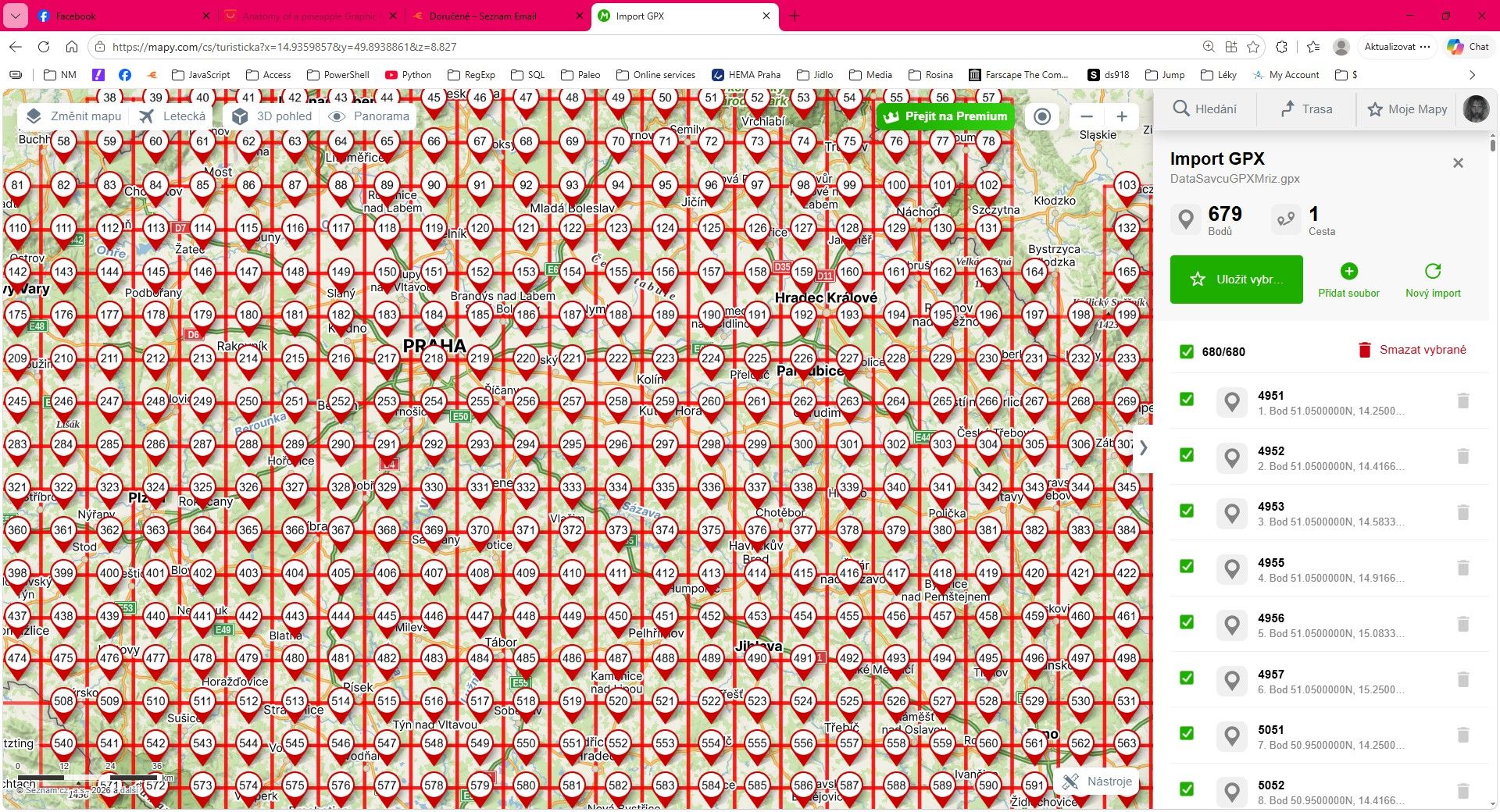
I am trying to import a GPX file. The import works, sort of, but I cannot get it to display labels (name, description) on the map. It instead displays a pin with a number, and I have to go to the side panel to see the text. I want to see the text (it is very short) directly on the map. Tutorials on the web seem to show I have the GPX file formed correctly, but Mapy.cz does not display them. How do I get it to display on the map?
-
You are not doing anything wrong with your GPX file.
Mapy.com displays the <desc> content during the initial stage of the import, but importing descriptions is not yet supported. Once the import is completed, only the <name> content is retained. The name is limited to 200 characters; otherwise, the import fails.
Displaying waypoint names directly on the map instead of numbered pins is not currently supported either.
GPX import functionality may be extended in the future, but these are the current limitations.
-
@Jan-Buriánek Okay, thank you. Is it at least possible to change the numbering of the pins, or is that done by the website automatically? If I could assign the pins a specific number, instead of just accepting 1- n, it would help a lot.
-
Where do you see the "numbers in the pins"? If you import GPX waypoints, they are marked with stars, not numbers.
Only intermediate points of a planned route are numbered, but these cannot be imported in the usual way.
What exactly are you trying to import? Could you provide a screenshot?
-
Or actually, maybe there is a better way to do it all. I am trying to overlay a grid onto the Czech Republic., with a label in the middle of each square. I formerly did it with a .KML file, but you no longer support that, so I am trying with a .GPX file - tracks and waypoints. Do you know of a better way to do that?
-
-
@Jan-Buriánek I tried to send you my .GPX file to look at, but it was not accepted. Here is the text of the first few points - the entire file is thousands of lines.
<?xml version='1.0' encoding='UTF-8'?>
<gpx version='1.1'>
<wpt lat='51.05' lon='14.25'>
<name>4951</name>
</wpt>
<wpt lat='51.05' lon='14.4166666666667'>
<name>4952</name>
</wpt>
<wpt lat='51.05' lon='14.5833333333333'>
<name>4953</name>
</wpt>
<wpt lat='51.05' lon='14.9166666666667'>
<name>4955</name>
</wpt>
<wpt lat='51.05' lon='15.0833333333333'>
<name>4956</name>
</wpt>
<wpt lat='51.05' lon='15.25'>
<name>4957</name>
</wpt>
<trk>
<trkseg>
<trkpt lat='51.1' lon='14.1666666666667'/>
<trkpt lat='51.1' lon='14.3333333333333'/>
<trkpt lat='51' lon='14.3333333333333'/>
<trkpt lat='51' lon='14.1666666666667'/>
<trkpt lat='51.1' lon='14.1666666666667'/>
</trkseg>
<trkseg>
<trkpt lat='51.1' lon='14.3333333333333'/>
<trkpt lat='51.1' lon='14.5'/>
<trkpt lat='51' lon='14.5'/>
<trkpt lat='51' lon='14.3333333333333'/>
<trkpt lat='51.1' lon='14.3333333333333'/>
</trkseg>
<trkseg>
<trkpt lat='51.1' lon='14.5'/>
<trkpt lat='51.1' lon='14.6666666666667'/>
<trkpt lat='51' lon='14.6666666666667'/>
<trkpt lat='51' lon='14.5'/>
<trkpt lat='51.1' lon='14.5'/>
</trkseg>
<trkseg>
<trkpt lat='51.1' lon='14.8333333333333'/>
<trkpt lat='51.1' lon='15'/>
<trkpt lat='51' lon='15'/>
<trkpt lat='51' lon='14.8333333333333'/>
<trkpt lat='51.1' lon='14.8333333333333'/>
</trkseg>
<trkseg>
<trkpt lat='51.1' lon='15'/>
<trkpt lat='51.1' lon='15.1666666666667'/>
<trkpt lat='51' lon='15.1666666666667'/>
<trkpt lat='51' lon='15'/>
<trkpt lat='51.1' lon='15'/>
</trkseg>
</trk>
</gpx>
Hello! It looks like you're interested in this conversation, but you don't have an account yet.
Getting fed up of having to scroll through the same posts each visit? When you register for an account, you'll always come back to exactly where you were before, and choose to be notified of new replies (either via email, or push notification). You'll also be able to save bookmarks and upvote posts to show your appreciation to other community members.
With your input, this post could be even better 💗
Register Login